Fit the gem layout
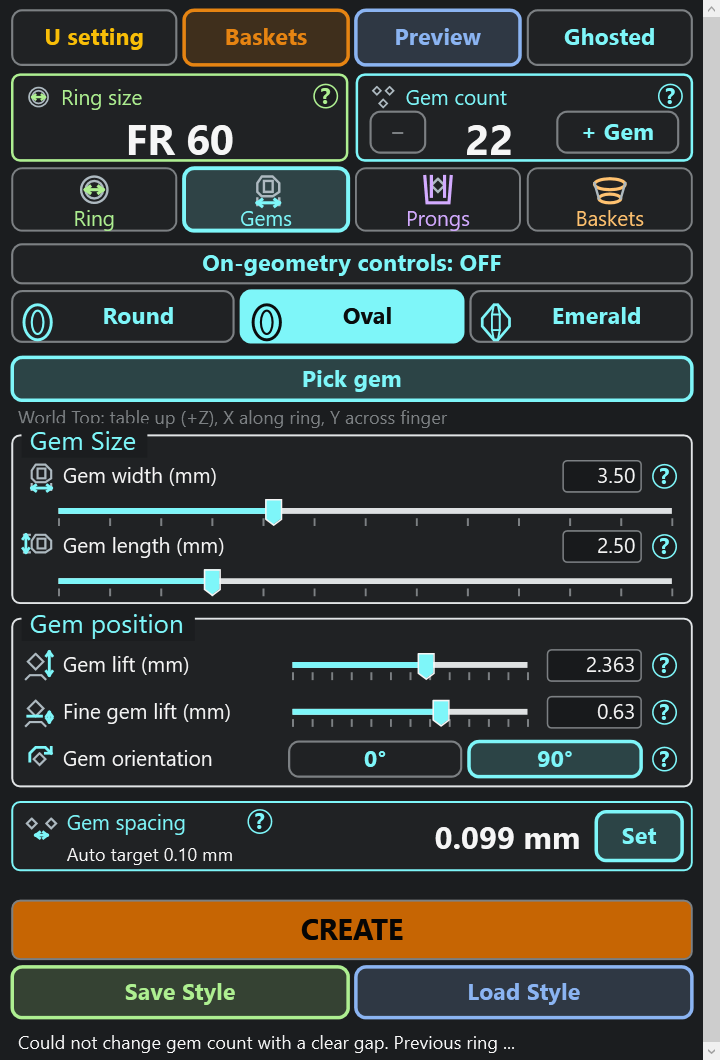
Choose round, oval or emerald gems, or pick a gem solid or closed mesh from Rhino. Add or remove gems one at a time and fit the gap toward 0.10 mm.
Rhino 7, 8 & 9 for Windows
Design eternity rings inside Rhino. Fit your stones, refine prongs and settings in a live preview, and create editable geometry.
Choose round, oval or emerald gems, or pick a gem solid or closed mesh from Rhino. Add or remove gems one at a time and fit the gap toward 0.10 mm.
Set prong dimensions and basket band sizes. Switch off the U bridge wall to leave the round pipe between the prongs.
Drag controls directly on the ring or type precise values. Turn on Ghosted to see the opaque gems through metal set to 70% transparency.
Save your settings as a style file, then reload them as a starting point for another design.
You’ll need Windows and a license for Rhino 7 (SR26 or later), Rhino 8 or Rhino 9.
.rhi installer.GNRingEternity.Already have a license? Sign in with your purchase email to find your key.
Open the Polar customer portalContact GN for access to the current Windows build and information about the planned subscription.
$7 USD / month
Planned monthly subscription. Contact GN for current availability.
Yes. Pick a closed Rhino solid or mesh. Orient the table upward before picking so the plug-in can measure and place the stone.
While online, run GNRingEternityLicenseStatus and select Deactivate this computer. Activate the key on your other computer.
Create adds the ring geometry to your Rhino document. Check stone fit, clearances and manufacturing requirements in your own production workflow.
This site has no sign-up or payment form. The hosting provider may process technical access information to deliver the site. GN uses your email address and message to answer your enquiry. The customer portal is hosted by Polar and uses Polar’s privacy terms.
The listed price is planned. Contact GN for current availability. Rhino is licensed separately.